Norton AntiVirus Plus in 2026: what it covers, what it leaves out, and who it fits
Advertising disclosure
This article is funded by advertising. Links marked partner link earn Beatiful House s.r.o. a commission if you buy through them. That commission is paid by the advertiser, not by you, and the price is the same as it would be if you went to the seller directly. No advertiser has seen, approved or paid for the content of this article, and no advertiser can have a sentence changed or removed. How that is kept true is set out in our editorial policy.
Not affiliated with the brand discussed. vestrova.online is an independent publication. It is not affiliated with, endorsed by or sponsored by Gen Digital Inc., Norton or LifeLock.
Norton AntiVirus Plus is the smallest paid plan Norton sells. It is a good deal narrower than most write-ups suggest, and that narrowness is the single most useful thing to understand before buying it. This article sets out what is in the plan, what is only in the more expensive ones, what independent testing actually measured, and the situations where you should buy something else or nothing at all.
The short version
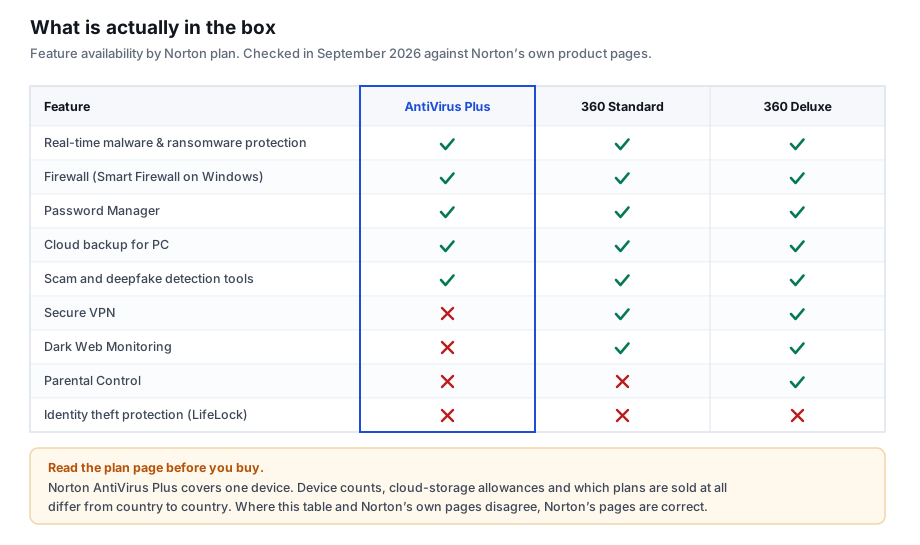
- Included: real-time malware, ransomware and online-threat protection; a firewall; Password Manager; cloud backup for Windows; Norton’s scam and deepfake detection tools; and the Virus Protection Promise.
- Not included: Secure VPN, Dark Web Monitoring, Parental Control and identity-theft protection. Those belong to the Norton 360 tiers or to Norton 360 with LifeLock.
- Coverage: one device.
- Watch the renewal. The advertised figure is an introductory first-year price.
1. What the plan actually includes
Norton AntiVirus Plus sits below the Norton 360 family. Its job is to stop malicious code from reaching and running on one computer, and to keep a copy of your files somewhere else in case something does. It is not a bundle of everything Norton sells, and reading it as one is where most disappointment starts.
The components Norton lists for the plan are, in the order you are likely to meet them:
- Online threat protection. Filtering that blocks addresses already known to host malware or phishing pages, before anything is downloaded.
- Real-time antivirus, ransomware and hacking protection. The scanning engine that checks files as they arrive, as they are written to disk and as they are run.
- A firewall. Smart Firewall on Windows, a firewall on macOS. It governs which programs may talk to the network and on what terms.
- Password Manager. An encrypted vault, with generation and autofill. This is the component most people underrate; section 6 explains why.
- Cloud backup for PC. Norton lists 2 GB with this plan. That is enough for documents and not close to enough for a photo library.
- Scam and deepfake detection. Norton’s newer tooling aimed at fraudulent messages and manipulated media rather than at executable malware.
- The Virus Protection Promise. Norton’s commitment that if your device gets a virus its experts cannot remove, you can get a refund. It is a contractual term with conditions attached, so read them rather than the headline.
2. What it leaves out — and four claims worth correcting
Marketing copy about Norton, including earlier copy on this site, has a habit of describing the whole Norton range and attaching it to the cheapest plan. Four claims in particular circulate widely and are wrong for Norton AntiVirus Plus.
| The claim | The position |
|---|---|
| “It includes a secure VPN.” | No. Norton Secure VPN is bundled with the Norton 360 tiers, not with AntiVirus Plus. If a VPN is the reason you are buying, this is the wrong plan. |
| “It includes dark web monitoring.” | No. Dark Web Monitoring starts at Norton 360 Standard. |
| “It includes identity-theft protection and credit monitoring.” | No. Those are LifeLock services, sold in Norton 360 with LifeLock plans, and their availability and scope differ sharply between countries. |
| “One licence covers your PC, Mac, phone and tablet.” | No. Norton AntiVirus Plus covers one device. Multi-device coverage is what the 360 tiers are for. |
A note on what changed here
An earlier version of this page repeated all four of those claims. They have been corrected rather than quietly deleted, because a reader who acted on the old version deserves to know what was wrong with it. The editorial policy sets out how corrections are handled.
3. How the detection actually works
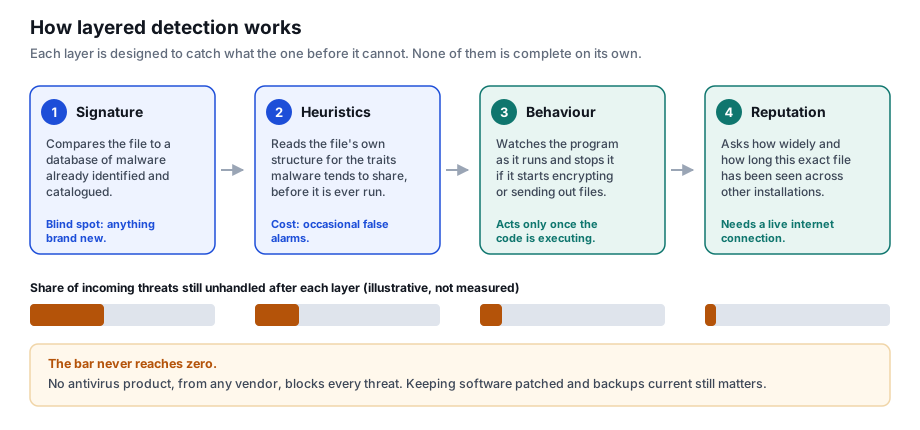
“Antivirus” is a single word for four different techniques that fail in different ways. Knowing which is which tells you what a product can and cannot promise.
Signature matching compares a file against a catalogue of malware already identified. It is fast and produces almost no false alarms, and it is useless against anything released this morning. Heuristic analysis reads the file’s own structure for the traits malware families share, which catches novel samples at the cost of occasionally flagging something harmless. Behavioural monitoring gives up on judging the file and watches the running program instead: a process that begins encrypting your documents in bulk gets stopped regardless of what it looked like beforehand. Cloud reputation asks a different question again — how many other installations have seen this exact file, and for how long. A binary that appeared forty minutes ago on eleven machines is treated with suspicion no static analysis would justify on its own.
4. When protection actually intervenes
Real-time protection is often imagined as a single moment of scanning. It is better understood as a series of checkpoints, each of which is the last chance to stop something cleanly.
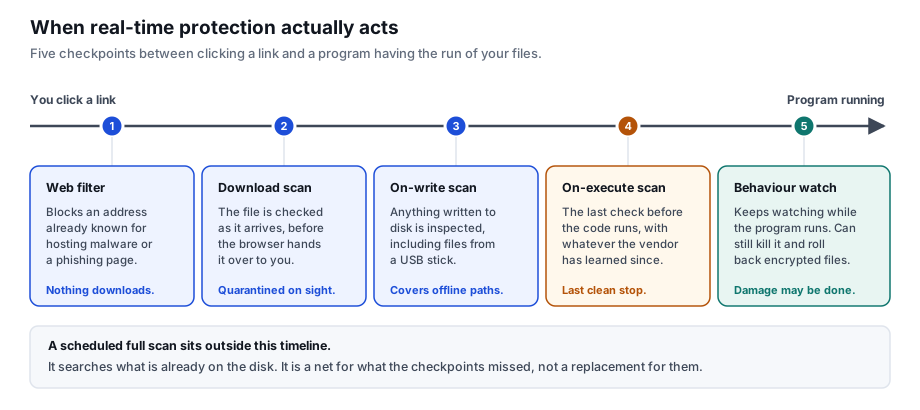
The practical consequence: if you find yourself disabling real-time protection because something is slow, you have switched off every checkpoint except the last one and kept only the scan that runs on Sunday. That is a much larger change than it feels like.
Looking at Norton AntiVirus Plus?
Check the current plan page for the price, the renewal price and the device count that apply in your country before you decide.
See the current Norton AntiVirus Plus offerPartner link · goes to the advertiserPartner link. If you buy after following it, Beatiful House s.r.o. is paid a commission by the advertiser. The price you pay is the advertiser’s own price and does not change because you came from here.
5. What independent testing measured
Two European laboratories publish comparable antivirus results on a fixed schedule: AV-TEST in Germany and AV-Comparatives in Austria. Their value is that they test every vendor against the same sample set in the same month, which is the only way a detection figure means anything.
In AV-TEST’s June 2026 home-user round on Windows 11, Norton 360 version 26.4 and 26.5 scored 6 out of 6 for protection, 6 out of 6 for performance and 6 out of 6 for usability, and carried AV-TEST’s “Top Product” designation. The April 2026 round returned the same three scores for versions 26.2 and 26.3.
Read that result carefully
AV-TEST tested Norton 360, not Norton AntiVirus Plus. The two share the same scanning engine, so the protection score is a reasonable indication for AntiVirus Plus — but it is an inference, not a measurement of the product on this page, and we are not going to present it as one. A perfect score in a given month is also a statement about that month’s sample set, not a permanent property. Check the current round rather than trusting a figure quoted in an article.
6. The password manager is the underrated part
Of everything in this plan, the component most likely to prevent a real loss is the least exciting one. The reason is arithmetic rather than technology.
When a service you signed up to years ago is breached, the attacker does not target you. Your email address and password land in a list, and software replays that pair against hundreds of unrelated services at machine speed. This is called credential stuffing, and it is why a breach at a hobby forum can end with your email account gone. The only thing that stops it is that the pair does not work anywhere else — which requires a different password per site, which in practice requires either a password manager or a memory nobody has.
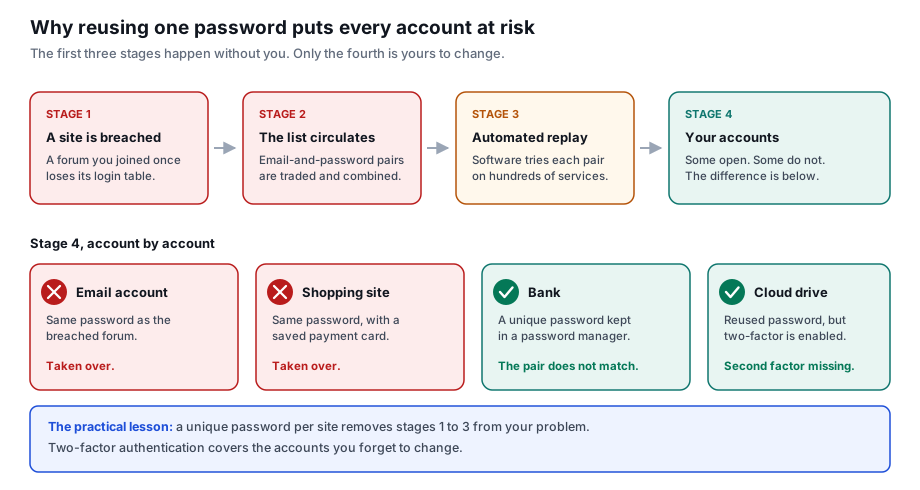
Two honest caveats. A password manager concentrates risk: the master password becomes the one credential that matters, and it needs to be strong and protected by a second factor. And Norton’s password manager is not the only option — the browser-built-in managers and the standalone ones are real alternatives, and some are free. The argument here is for using one, not specifically for this one.
7. Performance, without the folklore
The old complaint that security software cripples a computer is a decade out of date for the major vendors, but “imperceptible” is still too strong a word. AV-TEST’s performance category measures exactly this — the slowdown a suite imposes on launching applications, copying files and installing software — and Norton scored full marks in the 2026 rounds cited above.
What that does not tell you is how it will feel on your machine. A full scan on an older laptop with a mechanical hard disk is noticeable and always will be, because the bottleneck is the disk rather than the software. Schedule those for a time you are not using the computer, and judge the product on how it behaves during ordinary work.
8. Price and the renewal
Norton sells this plan, in common with most of the industry, at a discounted first-year price that rises at renewal. At the time of writing, Norton’s own United States page lists Norton AntiVirus Plus at $29.99 for the first year against a stated regular price of $59.99, renewing annually at the full price. Pricing and currency differ by country, and offers change.
Two things follow. First, compare renewal prices rather than introductory prices when you set one product against another, because the introductory price is a marketing figure and the renewal is what you will actually pay from year two. Second, note the renewal date somewhere you will see it, and check the cancellation and refund terms before you buy rather than after the charge appears.
9. Who it fits, and who should buy something else
It fits someone protecting a single Windows PC or Mac who wants a paid product with a firewall and a password manager included, and who does not need a VPN, parental controls or coverage for a phone.
Look at a Norton 360 tier instead if you have more than one device to cover, if you want the VPN, or if dark web monitoring matters to you. Buying AntiVirus Plus and then discovering it covers one machine is the most common way to be disappointed by it.
Consider buying nothing if you are running an up-to-date Windows 11 machine, you are disciplined about updates and backups, and Microsoft Defender’s built-in protection is meeting your needs. Defender is included, it is tested by the same laboratories, and it performs respectably. A paid product buys you the additional components and a support line, not permission to stop paying attention.
10. What no antivirus can do for you
It is worth being explicit, because the category is sold on reassurance. Antivirus software does not stop you from typing your password into a convincing fake login page. It does not recover files you have no backup of. It does not patch the router, the phone or the smart television. It does not prevent a company you trusted from losing your data. And no product from any vendor detects everything, which is why the honest framing is risk reduction rather than protection.
The habits that carry the most weight are unglamorous: apply operating system and browser updates promptly, keep backups on the 3-2-1 pattern, turn on two-factor authentication for email and banking first, and treat unexpected urgency in a message as the signal it usually is. Our online security basics guide covers each of these, and it carries no partner links at all.
If the plan matches what you need
Read the subscription and cancellation terms on the seller’s page first. This site cannot take payments, issue refunds or provide support for the product.
Open the Norton AntiVirus Plus plan pagePartner link · goes to the advertiserPartner link. If you buy after following it, Beatiful House s.r.o. is paid a commission by the advertiser. The price you pay is the advertiser’s own price and does not change because you came from here.
11. Sources and method
The feature lists in this article were read from Norton’s own product pages on 21 September 2026. The laboratory results were read from AV-TEST’s published Windows home-user rounds. Nothing here is based on a press release, an affiliate brief or a figure quoted second-hand from another article.
- Norton, Norton AntiVirus Plus product page — us.norton.com/products/norton-antivirus-plus
- AV-TEST, test results for Norton on Windows — av-test.org (June 2026 round: Norton 360 26.4 & 26.5, 6/6 protection, 6/6 performance, 6/6 usability, Top Product)
- AV-Comparatives, Real-World Protection Test series — av-comparatives.org
- ENISA, Threat Landscape — enisa.europa.eu
Where this article and the seller disagree
Feature sets, device counts, storage allowances, prices and plan names change, and they differ between countries. If anything on this page conflicts with the information Norton publishes on its own site or with the terms presented to you at the point of purchase, Norton’s own information prevails. Check the plan page and the subscription terms before paying.
Written by Sandra Adams. Published 21 September 2026. Corrections: info@vestrova.online. All illustrations on this page are original SVG diagrams drawn for this article by the editorial team; no product screenshots or stock photography are used.